
Multi-tenant DMARC: one pane for every client
See every client and every domain in a single multi-tenant DMARC dashboard, with the whole estate's posture at a glance and the worst problems surfaced first, instead of logging into each tenant to find out who needs you today.
Dashboard across every client
Domains monitored without logging into each
Score levels: domain, client, rolled-up
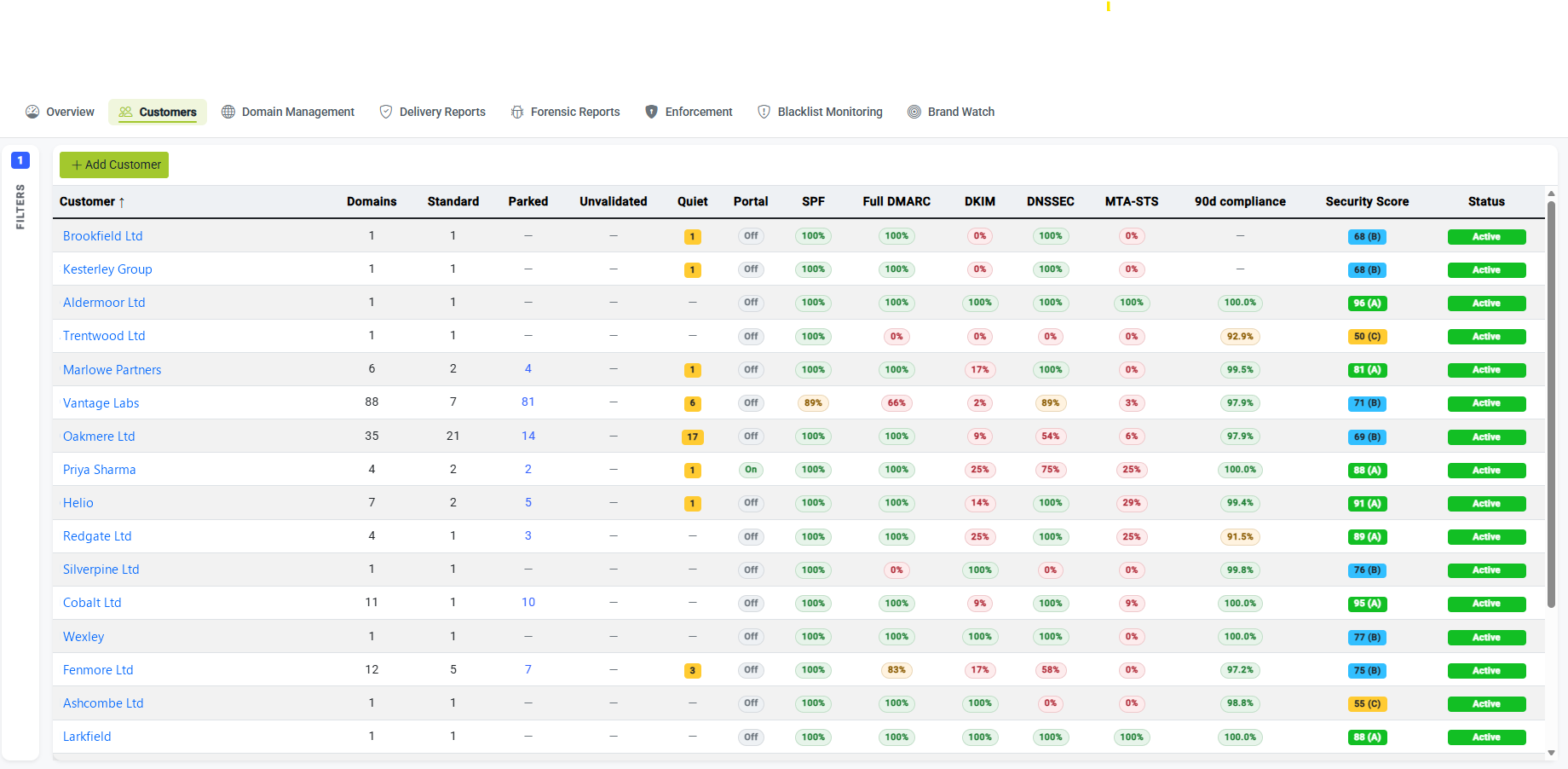
Every client, one screen
Each customer scored and risk-sorted, so the ones who need you today rise to the top.
Tenant-by-tenant hunting doesn’t scale
When every client lives in their own silo, finding the one that needs you today means logging in, looking, logging out, and repeating, across dozens of tenants and hundreds or thousands of domains. The problems that matter hide in the volume, and the only way to be sure you’ve caught them is to check everything, all the time, by hand.
DMARCER replaces that with a single multi-tenant view. Every client and every domain sits in one place, ranked so the worst exposure rises to the top, so attention goes where it’s needed instead of being spread evenly across clients who are fine.
One view instead of many logins
- Every client and domain on one screen
- No switching tenants to see who’s at risk
- Worst problems surfaced first, not buried
- Built to hold thousands of domains
One score, at every level you need it
The same security score works at three altitudes. Drill down to a single domain to see exactly what’s wrong, pull back to a per-client score to judge a whole customer at a glance, or roll the entire book up into one number that tells you how your estate is doing overall. Move between them in a click, without ever leaving the dashboard.
Per domain
Each domain’s posture out of 100, with the specific issues behind it: the detail you act on. How scoring works →
Per client
Every customer’s domains summarised into one score, so you can tell at a glance which clients are healthy and which need work.
Rolled up
The whole estate distilled into a single number and trend: the headline view of how your book of business is doing.
The whole estate’s posture, worst problems first
The dashboard is built around triage. Instead of an even wall of green and red, it surfaces the most exposed domains and the biggest drops in score at the top, so the first thing you see each morning is the work that matters most. You spend your day on the clients who need you, and trust that the rest are being watched.
Sort and filter the whole estate by risk, by client, or by the specific control that’s failing, and act without first hunting for where the problem lives.
- Most-exposed domains ranked to the top
- Biggest score drops flagged as they happen
- Sort and filter by risk, client or control
- Posture of the entire book at a glance
Scoped per-client views when you need to zoom in
The rolled-up view is for you; the scoped view is for the conversation. Narrow the dashboard to a single client to see only their domains, scores and open issues: a clean, focused picture you can work from on a call or take into a review, without the rest of your estate in the way.
Focused on one customer
Scope the view to a single client and see only what’s theirs (domains, scores and open issues) with everyone else’s data out of the picture.
Ready for a review
A clean per-client picture of posture and progress is exactly what you put in front of a customer to show the value of the service you run for them.
Act once, across many domains
Seeing the whole estate is only half the win; the other half is doing something about it without repeating yourself. Bulk actions let you apply the same change across many domains at once, so a fix or a policy step that used to mean working through tenants one at a time becomes a single operation. That’s what makes monitoring thousands of domains a job one team can actually run, and what keeps email security profitable to deliver. See how issues turn into tickets →
For your engineers
Start each day with the work that matters already at the top of the list, with no tenant-by-tenant hunting and no logging in everywhere just to confirm everything’s fine.
For your business
One pane that scales to thousands of domains is what turns email security from a per-client chore into a managed service you can run at margin. See it as a revenue line →
Where this fits
Recurring revenue →
Why this is a service worth selling.
Security score →
The 0–100 number behind every view.
Alerts & reporting →
Turn what you see into action.
PSA integrations →
Tie the estate into your own systems.
Run every customer from one place
See your whole estate in a single pane, or talk to us about onboarding your client base.
Sign up as an MSP Talk to us