
Know every sender. Spot the ones you don't.
You can't safely enforce DMARC until you know who legitimately sends as you. DMARCER turns raw sending IPs into named services, says how each one authenticates, and puts a spotlight on the senders you've never seen before.
Every sending service, not a wall of IPs
A % of your mail that's identified
Biggest unknown senders surfaced first
Your DMARC reports, finally readable
Every domain’s delivery and compliance, drawn from the same aggregate reports, in one sortable view.
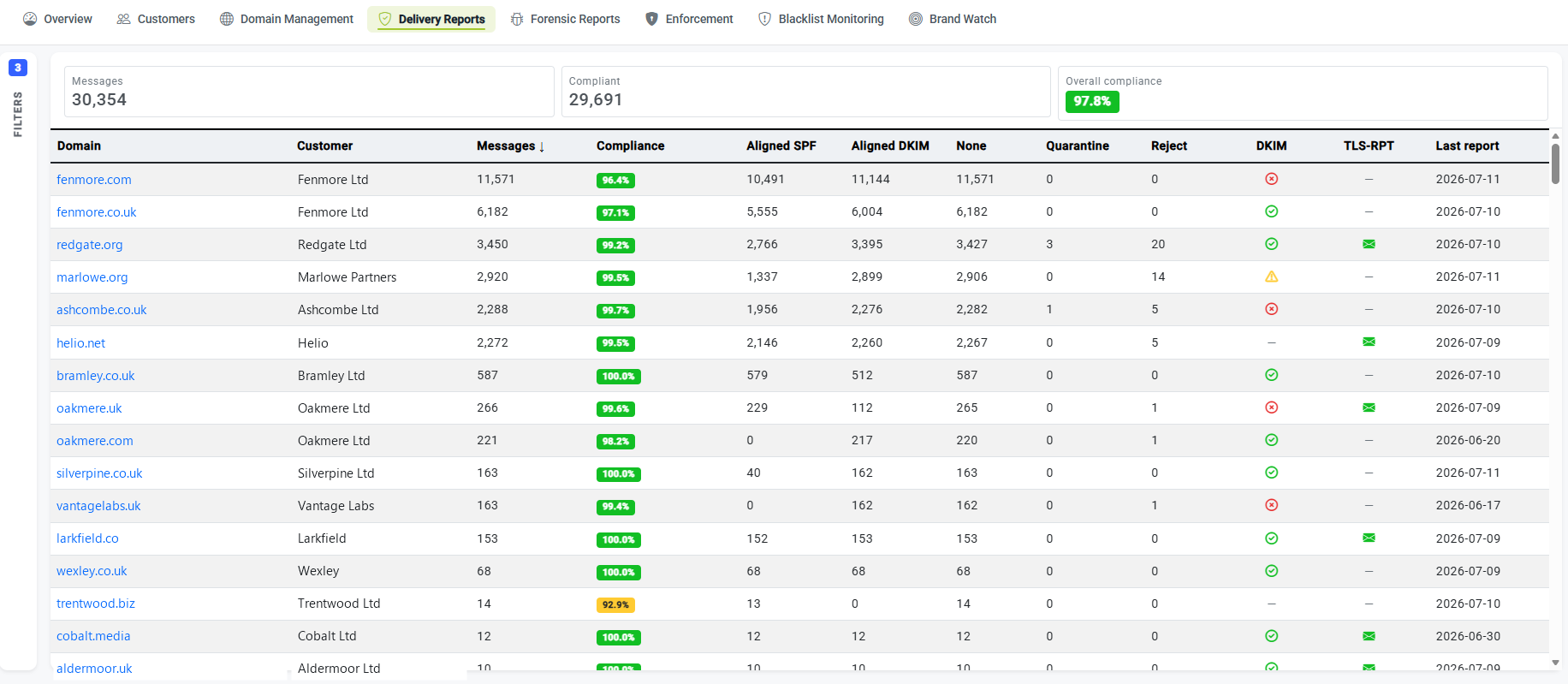
A DMARC report is a list of IP addresses
DMARC reports tell you which servers are sending mail in your name, but they identify those servers only by their IP address: a row of numbers like 40.107.0.0. That’s technically accurate and humanly useless. Is that Microsoft 365 carrying your real mail? A newsletter tool a colleague signed up for last month? A forwarder relaying your messages? Or someone in another country spoofing you outright? The numbers don’t say.
Until you can put a name to every one of those sources, you can’t make a single safe decision about enforcement. Tighten your policy while an unidentified-but-legitimate sender is still failing, and you block your own mail. Leave it loose because you can’t tell friend from foe, and you protect nobody. Naming the senders is the work that has to come first.
Why this matters: whoever you are
- Running your own domains? You finally see which services are sending as you, including the ones nobody told IT about.
- Managing clients? You build an authorised-sender picture for every client at once, instead of decoding raw IPs tenant by tenant.
From an IP to a name you recognise
DMARCER identifies senders in layers, so an unfamiliar address rarely stays unfamiliar for long. It starts with a curated catalogue of known email service providers and platforms, then falls back to the network an IP belongs to and the organisation that owns it, turning “some IP” into “your marketing platform” or “a hosting provider in Lithuania.”
Curated catalogue
A maintained library of known email service providers and sending platforms. When an IP belongs to a recognised service, DMARCER names it directly: your mail platform, your CRM, your invoicing tool.
Network (ASN) matching
Every IP sits inside a network: an Autonomous System, the block a provider routes. Matching on the network owner names senders the catalogue alone wouldn’t catch.
ISP / organisation
Where a service isn’t in the catalogue, the registered ISP or owning organisation still tells you who’s behind the address, enough to recognise it or rule it out.
Not just who: what kind, and how it authenticates
Knowing the name is half the picture; the other half is what the sender is and whether it’s set up correctly. DMARCER classifies each source (ordinary business mail, a bulk email service provider, a forwarder relaying messages on) because each type behaves differently and needs a different decision from you.
It also shows how each source authenticates and aligns: whether SPF and DKIM pass, and whether the part that authenticated actually matches the domain in your visible “From” address. A forwarder that breaks SPF but keeps DKIM aligned is a known, harmless pattern; a bulk sender failing both is something you fix before you enforce.
- Classified as business mail, ESP or forwarder
- SPF and DKIM result shown per source
- Alignment checked, not just raw pass/fail
- The behaviour you’d expect for that sender type
Every source, enriched so it’s easy to judge
A name on its own can still be ambiguous, so DMARCER enriches each source with the context you need to make a call at a glance: the country it’s sending from, the network owner behind the address, and the provider it resolves to. A source claiming to be your finance team but sending from a hosting network on another continent is suddenly very easy to recognise as a problem.
- Country of origin for every source
- Network owner behind the IP
- Provider the address resolves to
- Context that makes the odd one out obvious
The senders you’ve never authorised
The dangerous senders are the ones you don’t recognise. DMARCER’s unmatched-sources discovery lists every source that doesn’t match a known service, ranked by volume so the biggest unknowns rise to the top, whether that’s a shadow-IT tool to authorise or an attacker to shut out. Alongside it sits a single coverage figure: the percentage of your mail that’s been positively identified, so you always know how much of the picture is still dark.
Biggest unknowns first, and a number for the rest
Ranking by volume means you spend your time where it counts: the source sending thousands of messages a day gets your attention before the one that sent two. The coverage percentage turns a vague worry into a target you can drive up: identify the top unknowns, authorise the legitimate ones, and watch coverage climb until the only mail left failing is mail that should fail.
- Every unidentified source listed, biggest first
- Coverage %: how much of your mail is named
- A clear shortlist of what to investigate next
- Work the list down until coverage is high
Add your own entries for the senders only you know
No catalogue can know about your internal mail server, a niche regional provider, or a one-off line-of-business tool. So you can add your own entries: teach DMARCER to recognise the senders specific to you, and they’re named from then on instead of cluttering the unknown list. For a business that means your internal systems show up by name; for an MSP it means capturing the niche and bespoke senders you find across clients, so the same source is recognised everywhere you meet it.
This is what makes enforcement safe
Identify the good senders, authorise them, and the only mail left failing is the mail that should fail. That’s the foundation for moving confidently from monitoring to real protection. See the enforcement journey.
If you run your own domains
You get a named inventory of everything sending as you (the platforms you chose and the shadow-IT tools you didn’t) so you can authorise what’s real and challenge what isn’t, without an email specialist to interpret it.
If you manage clients
You identify senders across every client from one place, with coverage as a clear measure of progress, and your own catalogue entries make the niche senders you meet recognisable for every tenant you onboard next.
Where this fits in the platform
Enforcement journey →
Authorise the good senders, then enforce safely.
Forensic analysis →
A verdict on each failing message behind a source.
Hosted SPF →
Authorise senders without blowing the SPF limit.
For MSPs →
Run sender identification across every client.
See who’s really sending as your domain
Run a free check to get started, then name every sender across the domains you protect.
Check your domain